Table of Contents
Why Excel Is No Longer a Viable Solution for PF Trust Compliance
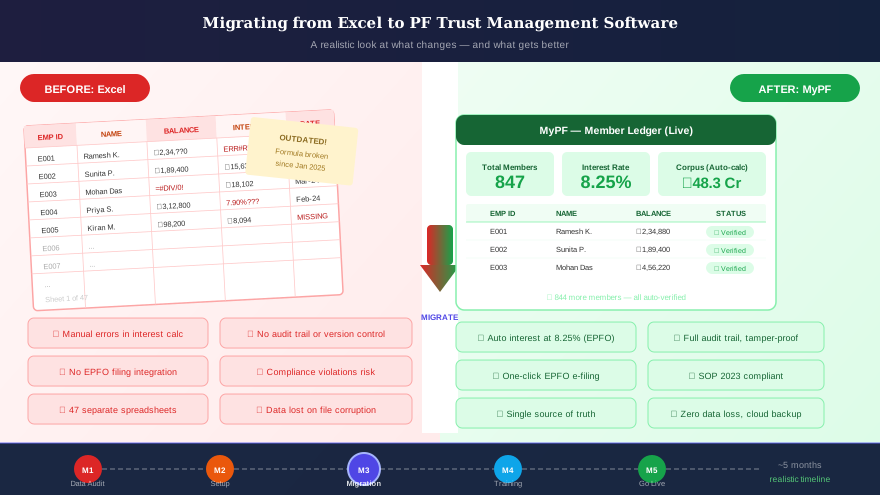
Spreadsheet-based PF trust management served many organisations adequately when compliance requirements were simpler and inspection frequency was lower. For trusts with a small member base and an experienced administrator whose institutional knowledge compensated for the absence of system controls, Excel produced reasonable results most of the time. The October 2023 SOP has ended the era in which "most of the time" is an acceptable standard for an exempted PF trust.
The quarterly investment reporting requirement, real-time 85/15 ratio monitoring, comprehensive member ledger auditing, and document-on-demand capability that EPFO now expects during inspections are structurally incompatible with manual spreadsheet management. When an EPFO inspector requests a certified portfolio snapshot for a specific date six months ago, purpose-built PF trust software in India produces a timestamped, locked system record. A spreadsheet produces a reconstructed printout. The evidentiary difference in an inspection context is very significant.
Months 1–2: Data Audit and Preparation
The most time-intensive phase of any migration is data preparation, not software configuration. Before a single record is imported into the new platform, conduct a rigorous audit of your entire Excel dataset. For each member, validate: the opening PF balance used as the starting point, contribution history by month and financial year, interest credited per year at the correct rate, all withdrawals and transfers processed, and the current closing balance. Identify every gap — months with missing data, unexplained balance variances, or members whose records are distributed across multiple file versions or archived workbooks.
Allocate a minimum of four to six weeks for this data audit phase and resist the pressure to accelerate it. Data quality at the point of migration determines the accuracy of every output the software produces for years afterward. Involve your payroll team for contribution data validation and your statutory auditor for verification of member balances against the trust's audited accounts.
Month 3: Software Configuration and Data Import
With clean, validated data in hand, work with your PF trust software vendor to configure the platform for your trust's specific operating parameters: contribution rate structures, approved investment categories, interest crediting rules and timelines, document templates, and access controls. A reputable vendor of PF trust software in India will provide a structured onboarding programme with a dedicated implementation team.
The data import phase must include a formal validation step before the full migration is executed. The vendor's team maps your spreadsheet data structure to the platform's import format, runs a test migration on a representative sample, and you verify that member balances, contribution totals, interest calculations, and investment figures match your source records exactly. Only after this validation is signed off should the full data migration proceed.
Month 4: Parallel Running and Output Validation
Following the full data import, operate both your existing Excel process and the new PF trust software in parallel for a minimum of one complete month — and ideally one full quarter. For the same period, generate outputs from both systems independently and compare them systematically: member closing balances, monthly interest computations, investment ratios, and Form 3A data. Every discrepancy must be investigated to its root cause and resolved before the Excel process is retired.
The parallel-running phase is non-negotiable for any trust that will use its software's outputs as the basis for EPFO filings or inspection documentation. Document all parallel-running comparison results formally and retain them — they form part of your migration audit trail and demonstrate the due diligence of the transition process to any future EPFO inspector.
Month 5 Onwards: Full Go-Live and Continuous Operation
After successful parallel validation, fully transition to the new platform. Archive your complete Excel file history in a secure, date-labelled storage location — these files constitute part of your permanent compliance record and must be retained, not deleted. Train all relevant team members on the live platform, conduct a structured post-go-live review at the three-month mark, and assess whether any data anomalies or process gaps have emerged from the first full quarter of live operations.
Migrating to dedicated PF trust software in India is among the highest-impact compliance investments an exempted trust can make. The combination of accurate, audit-ready records, automated compliance alerts, and inspection-ready documentation substantially reduces both regulatory risk and administrative overhead on a continuing basis. Contact MyPF Software to start your migration to a platform designed specifically for India's exempted PF trusts.
Still weighing whether to migrate at all? The three-way comparison sets out the cases where a spreadsheet is genuinely still adequate.
Ready to simplify your PF trust compliance?
MyPF Software helps exempted PF trusts stay inspection-ready, automate filings, and manage investments — all in one platform built for India.